Notes from Jason Hartley
Patterns we see most often when verifying applications
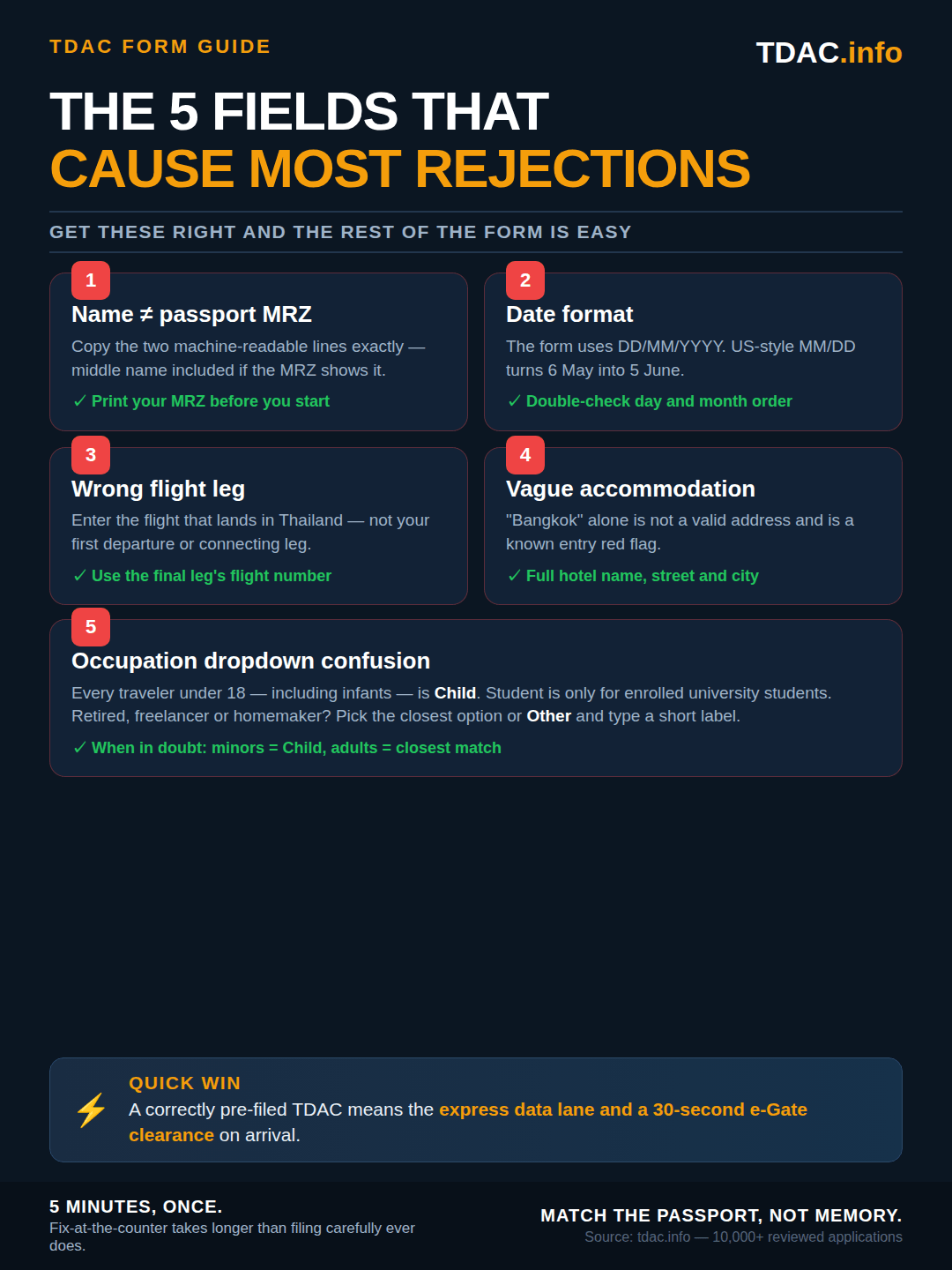
- Passport name mismatches (MRZ vs. typed) are the single most common reason an application gets flagged at the gate.
- Children's occupation field — must be selected as 'Child', not left blank or set to 'Student'.
- 'Bangkok' alone is not a valid address. Use the hotel street, district, and postcode as printed on your reservation.
In force since 15 September 2026: the visa-free stay is 30 days
Thailand's Royal Gazette published the new visa-exemption framework on 31 August 2026 and it took effect on 15 September 2026. The standard visa-free stay is now 30 days for 60 countries and territories, not 60 days for 93. Travellers who arrived up to and including 14 September 2026 keep the 60-day stamp they were given. Anything below that refers to a 60-day stay describes the rules before 15 September. Full detail in our Royal Gazette report and the country-by-country visa page.
Key Takeaways
- Passport Data: Must match the Machine Readable Zone (MRZ) exactly.
- Address: "Bangkok" is not enough. You need a full hotel or condo address.
- Timing: Submit at least 3 days before travel for safety.
- Solution: Use our agency service to have an expert verify your data before filing.
The transition from the blue TM6 paper card to the Digital Arrival Card (TDAC) was meant to speed up immigration. However, the digital system is far stricter than a human officer. The computer cannot "guess" what you meant if you make a typo.
August 2026 update: the Immigration Bureau's new THIM app (Thailand Immigration Management) can file the same TDAC from your phone — passport scan, up to 10 travellers, official launch August 2026. The fields are identical to the web form, so everything below applies whether you use the app, the portal or our assisted service. Details in our THIM update.
This guide breaks down the form field-by-field, highlighting the exact areas where travelers get rejected.
THE 5 CRITICAL FIELDS
1. Personal Details (The "MRZ" Rule)
The most critical rule of the TDAC is this: Your input must match the Machine Readable Zone (MRZ) of your passport.
The MRZ is the two lines of code at the very bottom of your passport photo page. The scanner reads this, not the formatted text above it.
Correct Way
First Name: MICHAEL JAMES
Include middle name if it appears in the MRZ
Passport No: M12345678
Wrong Way
First Name: MIKE
Do not use nicknames
Passport No: M1234567B
Confusing '8' with 'B'
Common Name Errors
- Middle Names: If your passport lists "Given Names: John William", you must enter "John William" in the First Name field. Do not drop the middle name.
- Special Characters: Hyphens (e.g., Jean-Luc) or accents (e.g., Müller) often cause system errors. Use the MRZ spelling (e.g., MUELLER).
2. Visa Information
Select Visa Exemption if you are a tourist from a visa-free country, Visa on Arrival only if you will pay 2,000 THB at the counter, and Tourist or Non-Immigrant for long-stay visas. This section confuses many travelers because the options do not always match the common name of your visa.
- Tourists (No Visa): Select "Visa Exemption" (not "Visa on Arrival").
- Paid VOA: Select "Visa on Arrival" only if you plan to pay 2,000 THB at the counter or have an E-VOA.
- Long-Term: For Elite, LTR, or Retirement visas, select "Tourist" or "Non-Immigrant" depending on the specific dropdown options available at the time.
3. Address in Thailand (The #1 Rejection Reason)
You cannot simply write "Bangkok" or "Phuket." The system validates the address against a database of provinces and districts.
How to format your address correctly:
- Hotel: "Grand Hyatt Erawan, 494 Rajdamri Road, Lumphini, Pathum Wan, Bangkok 10330"
- Condo/Airbnb: "The Base Condo, Unit 88/99, Sai 2 Road, Pattaya City, Bang Lamung, Chon Buri 20150"
Pro Tip: Always have your booking confirmation PDF ready. Copy the postal code first — this often auto-fills the Province and District fields correctly.
4. Arrival Details
- Arrival Date: Use the date you land in Thailand. If your flight leaves London on the 1st and lands on the 2nd, enter the 2nd.
- Flight Number: Enter your international flight number (e.g., EK372). If you have a connecting domestic flight on the same ticket, use the international flight that brings you into the Kingdom.
5. Occupation Field (What to Select)
Select Child for anyone under 18 (including infants), Student for university students, Retiree for retired travelers, and Employee or Business Owner for working adults. The occupation field confuses many travelers, especially parents filing for young children. Here is exactly what to select:
| Your Situation | Select This |
|---|---|
| Child or infant (any age) | Child |
| University/school student | Student |
| Retired | Retiree |
| Working for a company | Employee |
| Freelancer or business owner | Business Owner |
| Homemaker, unemployed, or other | Other |
For Parents Filing for Children
Select Child for every passenger under 18, including infants. Do not leave this field blank or select Employee. The occupation field is informational only and is not validated against your visa type, but selecting the wrong option can cause processing delays.
6. TDAC Occupation Dropdown: Full List of Options
Many travelers search the exact phrase "select Child" occupation TDAC or TDAC occupation dropdown options — so here is the complete list, in the same order it appears on the official tdac.immigration.go.th form, with the right answer for every situation.
Select Child from the occupation dropdown for every passenger under 18, including infants, toddlers, and school-age children. If your form doesn't show the Child option (some older form versions hide it), select Other and type Child, Minor, or Dependent in the free-text box that appears. The occupation field is informational only — it isn't validated against your visa type, but selecting the wrong option (e.g., leaving an infant as Employee) can cause processing delays at the e-gate.
| Dropdown Option | When to Select It | Notes |
|---|---|---|
| Employee | Salaried worker (any industry) | Use even if you currently work remotely |
| Business Owner | Founder, partner, freelancer, self-employed | Includes digital nomads with their own LLC |
| Student | Currently enrolled in school or university (any age) | Only for the actual enrollee — not for siblings under 6 |
| Retiree | Retired from paid work | Use even if you take occasional consulting jobs |
| Child | Every minor under 18, including infants (0–2) | If 'Child' is missing, use 'Other' → 'Child' |
| Other | Homemaker, unemployed, between jobs, sabbatical | A free-text box appears — type a short label (e.g., 'Homemaker') |
TDAC Occupation Free-Text Field
If you select Other, the form reveals a free-text box. Keep it short and ASCII-only — Homemaker, Unemployed, Sabbatical, Dependent, Child, Minor, or Volunteer all work. Do not paste long job titles or punctuation; the field has a character limit and some accented characters cause silent rejection.
More child-occupation questions
What should I put for occupation on TDAC for a child?
What is the TDAC occupation field for infants and babies?
Should I select Student for my child on TDAC Thailand?
What are all the TDAC occupation field options?
Does the TDAC occupation field have a free-text option?
7. Common Questions about Mistakes
I put the wrong flight number. Does it matter?
I submitted with the wrong passport number!
Ready to file your TDAC?
Let our experts review your data and file the application for you. We catch typos and date errors before they cause problems at immigration.
Start TDAC ApplicationReviewed by
Jason Hartley
Travel Documentation Specialist · TDAC.info
Last reviewed on
Fact-checked against the official Thai Immigration Bureau guidance.